


A shopper in Pune adds a ₹1,499 skincare kit to their cart, enters their PIN code and pauses when the delivery estimate appears. Later that evening, they remember the kit but can’t find the checkout link. A WhatsApp reminder can put the link back in their hands and give them someone to ask about delivery. A coupon would have missed the point.
That’s where a WhatsApp abandoned cart strategy earns its keep. It helps shoppers who were close to ordering resume checkout, while giving your team a way to spot the shipping, payment and trust issues that a reminder alone can’t fix.
Start with checkouts you can actually recover
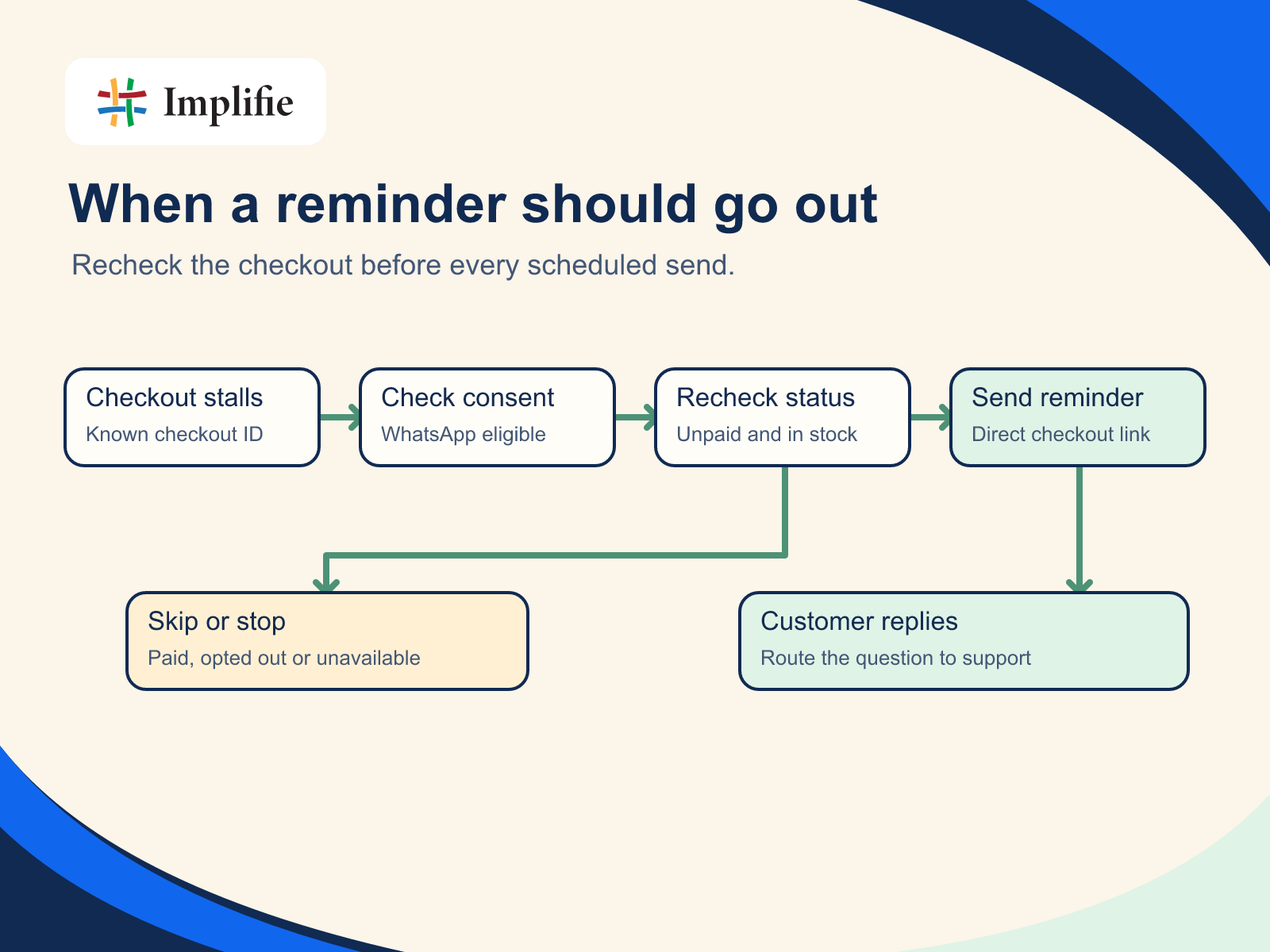
Use a checkout event with a known shopper, a unique checkout ID and a valid resume link. Wait for a period of inactivity, then check whether the order went through. Before sending, verify recorded WhatsApp permission, a working link and current availability. Exclude opted-out shoppers, completed orders and carts that need a fresh quote. If the same shopper starts several checkouts, keep one active reminder sequence for the latest eligible checkout.
Submit the reminder as a marketing template for approval when required. Keep the checkout link on your own store domain, and tell shoppers how to opt out. Use the WhatsApp Business Messaging Policy when setting up consent and opt-outs.
Send a useful reminder before offering a discount
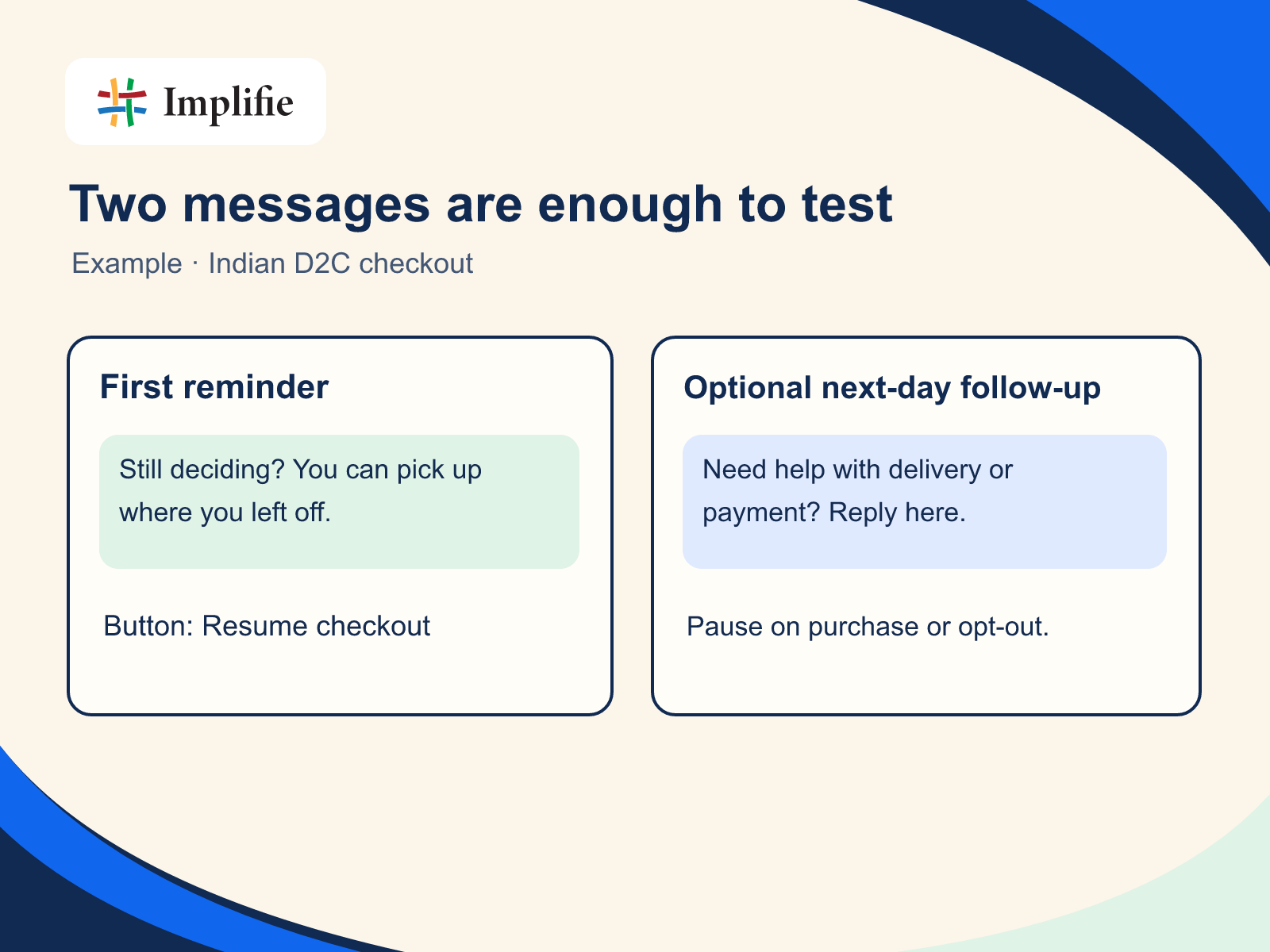
Start with one reminder, for example 60 minutes after a checkout goes quiet during your sending hours. Give the shopper a direct way back: “Hi [first name], you left something in your cart at [brand]. You can resume checkout below. If you have a question about delivery or payment, just reply here.” Use a “Resume checkout” button that opens the saved checkout on mobile.
If the first reminder leaves enough qualified carts open to justify a second test, try one short follow-up the next day. Offer practical help with a delivery estimate, a failed UPI payment or cash-on-delivery eligibility for the shopper’s PIN code. Stop scheduled reminders when an order comes through or the shopper opts out. Pause the sequence when someone replies so support can handle the conversation.
Fix the friction the replies reveal
If five people ask about shipping charges, check when the fee first appears. If shoppers ask whether COD is available, show eligibility in checkout and make any COD fee clear. When a UPI payment is pending, check the order and gateway status before suggesting another attempt so the shopper doesn’t pay twice.
Baymard’s checkout research identifies extra costs and slow delivery among common reasons shoppers leave. Treat your WhatsApp replies as a way to find out which issues affect your own store. Test a discount only where price appears to be the blocker. For COD, check delivered orders and returns to origin before deciding whether the campaign actually paid off.
What recovering 30% would look like
Say eligible abandoned checkouts total ₹1,00,000 and shoppers place ₹30,000 in orders from those checkouts within your chosen recovery window. That’s 30% gross recovery by value in this example. It includes orders some shoppers might have placed on their own.
To estimate what WhatsApp added, randomly hold back a comparable group from the WhatsApp reminders while keeping email and other outreach consistent. If the reminder group recovers 30% by value and the holdout recovers 20%, the gap is 10 percentage points. With ₹1,00,000 in eligible checkout value in the reminder group, that gap suggests about ₹10,000 in incremental gross recovered value before discounts, cancellations, returns and messaging costs. Compare net realized revenue or contribution once orders settle, especially if COD makes up a large share.
How Implifie fits into the workflow
Start with one checkout source and one reminder. Verify that the store can pass the checkout ID, consent, current order status and a working resume link. Then use Implifie’s WhatsApp automation for ecommerce and template management to prepare consistent messages, and configure follow-up automation around the checkout events available from your integration. Test a completed purchase, an opt-out and an unavailable item before turning on the sequence for live shoppers.
Frequently asked questions
When should I send the first abandoned cart WhatsApp message?
Start by testing one reminder about an hour after an eligible checkout goes quiet, within your normal sending hours. Check consent, order status and the checkout link again before sending.
Do I need to offer a discount to recover a cart?
Start with a direct resume-checkout link and a clear way to ask for help. Test an incentive only if price appears to be the blocker, and compare delivered orders and margin before scaling it.
Can WhatsApp recover 30% of abandoned checkout value?
Treat 30% as a scenario to measure against your own results. Divide recovered order value by eligible abandoned checkout value within a defined window, and use a holdout to estimate how much the reminders added.